Documentation
Models
Build your Model catalog with per-token pricing so Credits and Outcomes can be tracked and costed.
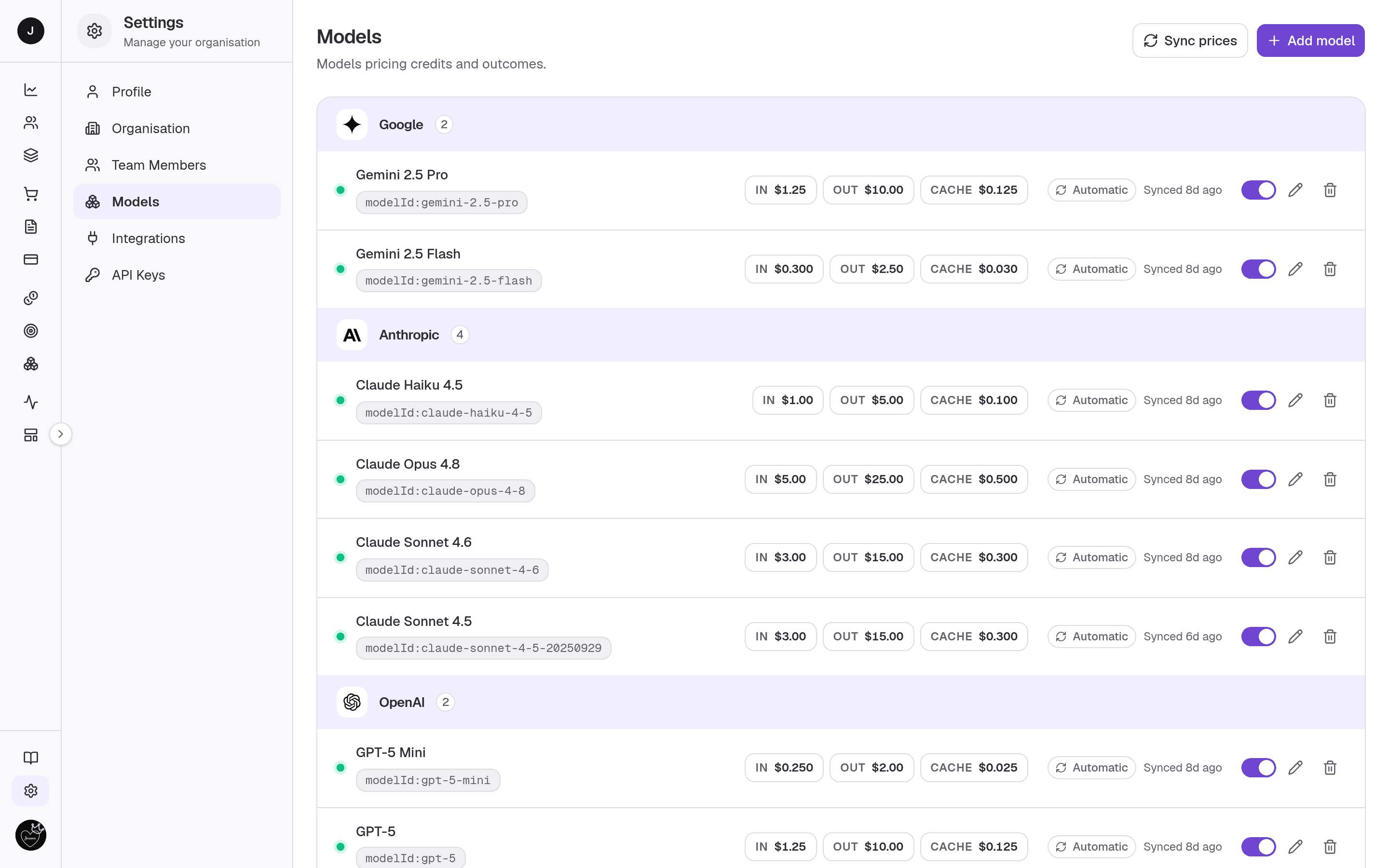
Models is your workspace's catalog of AI models and their per-token prices. The prices you set here are what Credits and Outcomes are tracked and costed against, so this page is the foundation for accurate revenue and margin. Models are grouped by provider, each with an active switch and its input / output / cache pricing. Owners and admins add, reprice, activate, and remove Models; everyone else sees it read-only.
What you can do here
- Add a Model from the built-in pricing catalog.
- Turn a Model active or paused with its switch — active Models are available to the Credit and Outcome calculators.
- Edit a Model's per-token pricing.
- Sync automatic prices from the catalog in one click.
- Copy a Model's provider model id.
- Remove a Model from the workspace.
Owner or admin only
Adding, repricing, activating, and removing are available to owners and admins. Members see each Model's Active / Paused state but can't change anything.
On this page
The Models directory is grouped by provider, one row per Model.
A Model row
- Identity — a live dot (pulsing green when active, grey when paused), the
Model name, and a copyable
modelId:…badge. - Pricing — three pills, In, Out, and Cache, showing the per-1M-token price. Paused Models show these dimmed.
- Pricing mode — Automatic (kept in sync with the catalog, with a "last synced" hint) or Manual (a price you entered yourself).
- Controls — an active switch, an edit pricing (pencil) button, and a remove (trash) button.
Header actions
- Sync prices — appears when any Model uses automatic pricing; re-pulls the latest catalog prices.
- Add model — opens the add dialog.
When there are no Models yet, an empty state invites an owner/admin to add the first one.
Adding a Model
- Press Add model. The pricing catalog loads the first time you open the dialog (and is reused afterwards).
- Pick a provider and Model. Its catalog price pre-fills automatically.
- Confirm to add it. The row appears in the directory, ready to activate and price into Credits and Outcomes.
Removing a Model takes it out of the calculator, but Credits already priced with it keep their stored base price.
Related
- Signals — the tracked usage that Models price; enabling and pricing Models here is what makes tracking meaningful.
- Organisation settings — where you set the currency these prices are shown in.
- API Keys — authenticate the SDK/API that records the usage these Models cost.