Documentation
Purchases
Link a Customer to a Plan, then track its billing schedule, Invoices and Payments over time.
A Purchase links a Customer to a Plan and drives
its billing. When a Purchase reaches its billing date an
Invoice is raised, and each cycle repeats until
the Purchase is cancelled. This page lists every Purchase in the workspace and
lets owners and admins create and manage them.
What you can do here
- Record a Purchase — assign a Plan to a Customer (owners and admins).
- Change plan — swap a Customer onto a new Plan; the previous one is cancelled in the same step.
- Pause / enable auto-billing — pausing captures a reason.
- Delete a Purchase. This removes the record only; any Wallet, Credit or Outcome effects already applied are not reversed.
- Open a Purchase to see its billing schedule, Invoices and Payments.
On this page
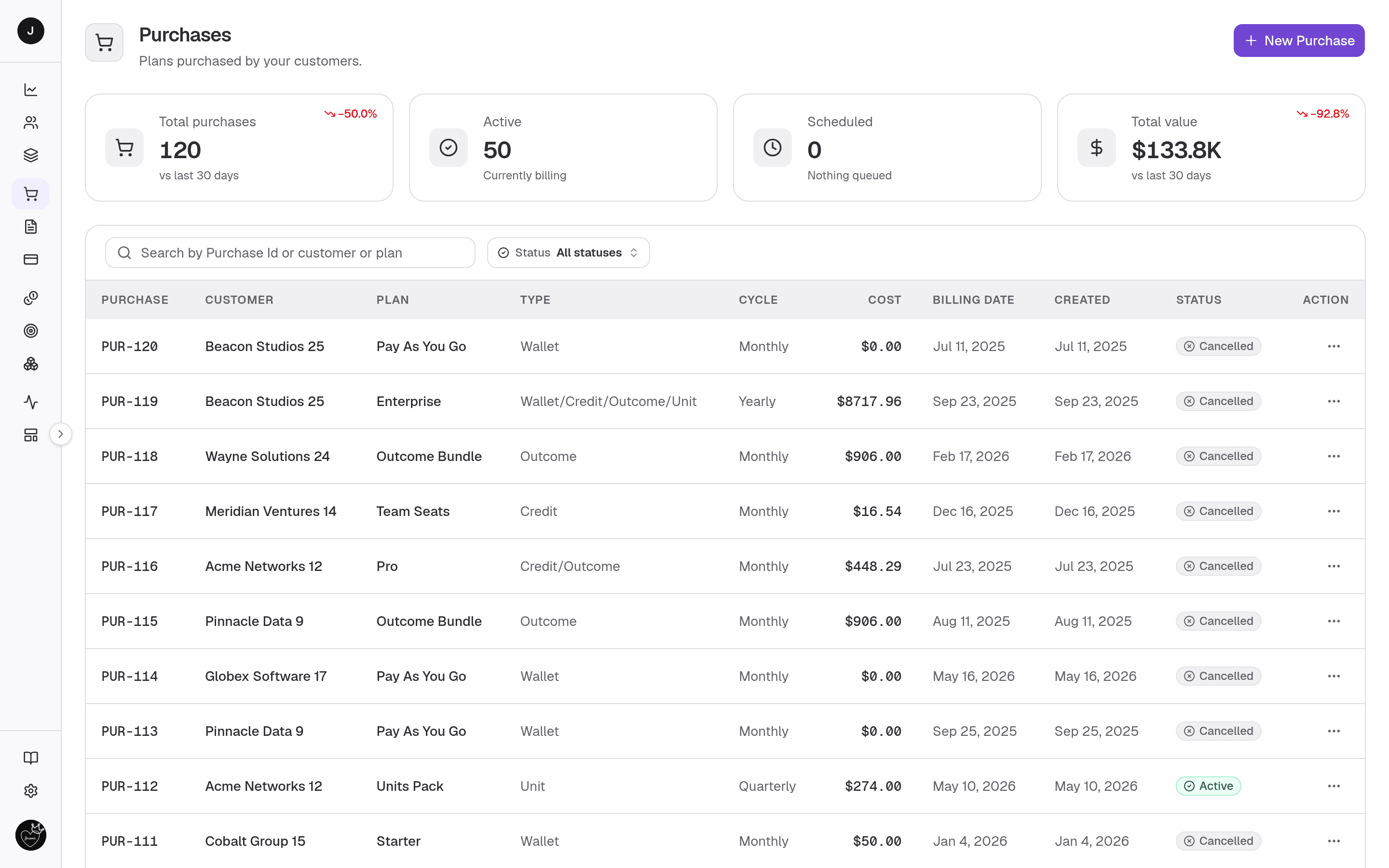
Four stat cards head the page:
| Card | What it shows |
|---|---|
| Total purchases | Count across the workspace (with active / scheduled / cancelled or a 30-day trend). |
| Active | Purchases currently billing. |
| Scheduled | Purchases awaiting their first Invoice. |
| Total value | Combined value of active and scheduled Purchases. |
Below the cards, a searchable, paginated table. Search matches Purchase id, Customer or Plan; a Status filter (Scheduled / Active / Cancelled) narrows the rows.
| Column | Description |
|---|---|
| Purchase | The Purchase number (links to the detail view). |
| Customer | The subscribed Customer. |
| Plan | The purchased Plan. |
| Type | What the Plan funds (Wallet, Credit, Outcome, Unit). |
| Cycle | Billing cadence (Monthly, Yearly, Free, …). |
| Cost | Price per cycle. |
| Billing date | The next (or scheduled) billing date. |
| Created | When the Purchase was recorded. |
| Status | Scheduled, Active or Cancelled. |
Managers also get a per-row ⋮ menu — Pause / Enable auto billing, Change plan and Delete.
Detail view
Opening a Purchase (/purchases/{id}) shows its full billing picture.
- Header — the Purchase number, a subtitle reading "Plan plan for Customer" (both linked), a billing-cycle chip, the created date and the status. Managers get an Edit button and a header control to Pause / Enable auto billing.
- Stat cards — Price / cycle, Invoices (count, with paid count),
Billing date and Renews in (a countdown to the next cycle). Free Plans
never renew, so their billing and renewal cards read
—. - Tabs — Invoices (with per-row PDF, pay and void actions) and Payments. The Payments tab loads on first open.
Creating a Purchase
New Purchase (or Change plan / Edit) opens a dialog with a live order summary:
- Customer (required) — locked when changing an existing Customer's Plan.
- Plan (required) — only active Plans are selectable.
- Billing date (required) — the Invoice is generated now; a future date sets when it falls due.
- Notes — an optional reference or PO number.
- Auto-billing — off by default. When on, Invoices from the second billing cycle onward are charged automatically against the Customer's saved card. Free Plans raise no Invoices, so the toggle is disabled for them.
The order summary on the right shows the first cycle's charge:
- Subtotal — the Plan's price, before tax.
- Tax — the total tax for the Customer's country. Hover the ⓘ to see
each tax and its amount. It reads
—until a Customer and Plan are picked, and$0.00when no tax applies. - Amount due — what the Customer is billed, with how often it repeats.
Taxes come from Settings → Taxes, based on the Customer's billing country.
Change plan cancels the Customer's current Plan and creates the replacement in one step.
Using your own customer id
When you create a Purchase over the API, you can name its Customer by your own
externalId instead of customerId (if both are sent, customerId wins).
Listing Purchases still filters by customerId only. See
Your own customer ids.
curl -X POST https://payments.clocknext.com/api/v1/purchases \
  -H "Authorization: Bearer $CLOCKNEXT_API_KEY" \
  -H "Content-Type: application/json" \
  -d '{ "externalId": "acme-42", "planId": "plan_growth" }'
const purchase = await cnk.purchases.create({ externalId: "acme-42", planId: "plan_growth" });Related
- Invoices — raised as a Purchase is billed.
- Payments — the resulting settlements.
- Customers · Customer detail — who the Purchase belongs to.
- Purchases API — subscribe a Customer to a Plan over the API.