Documentation
Payments
Browse the settled Payment history across the workspace, including customer-portal Payments, with receipts.
Payments is the read-only record of every settlement in your workspace —
Invoices paid by an operator plus Payments Customers made themselves through the
customer portal. Open Invoices are settled
from the Invoices page; this page is history you
can search, filter and export receipts from.
What you can do here
- Review the workspace's settled Payments, newest first.
- Search and filter by payment method.
- View or download a payment receipt.
- Open a Payment for its receipt and the Invoice it settled.
This view is read-only — there is no "new payment" action here.
On this page
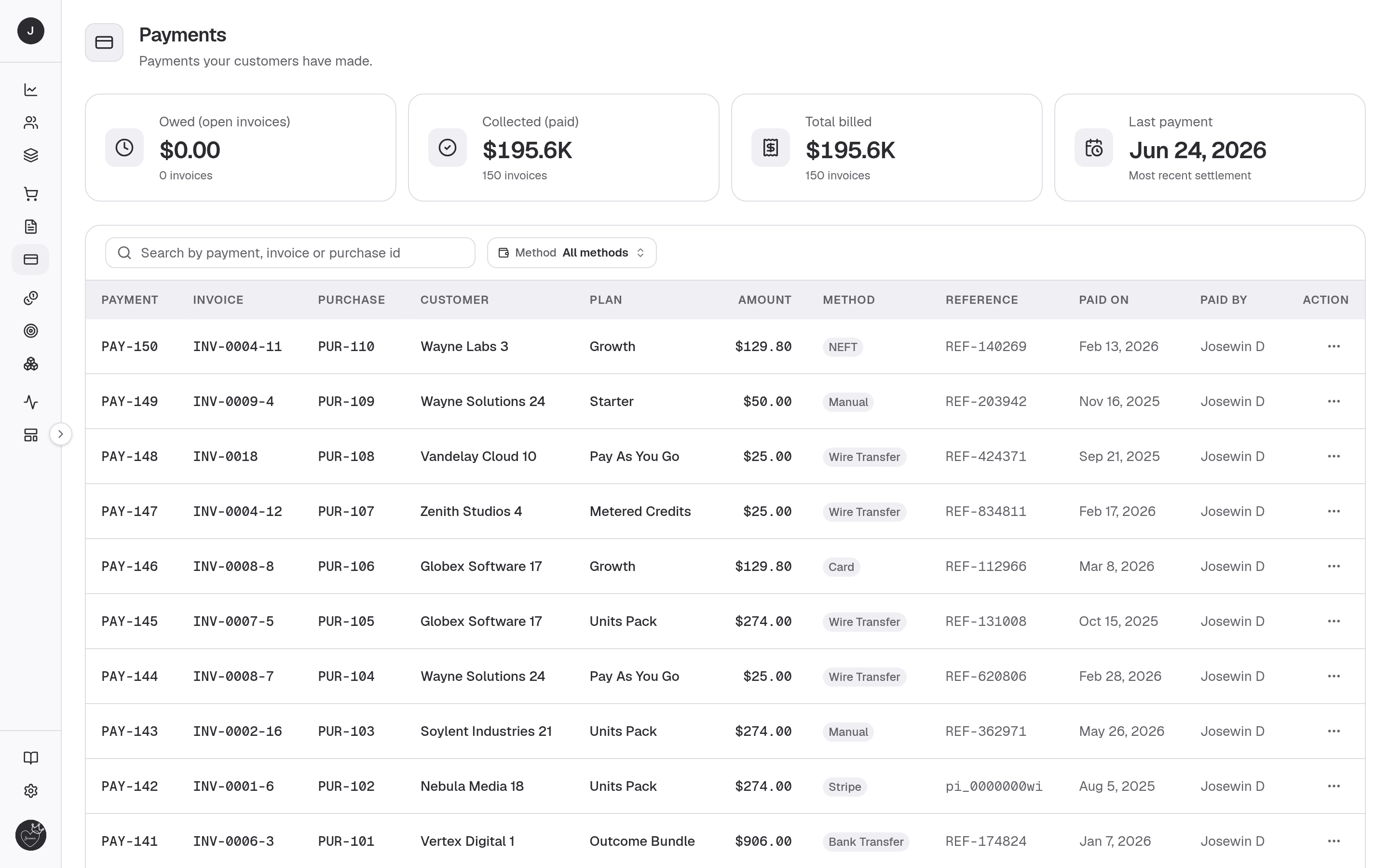
Four stat cards head the page:
| Card | What it shows |
|---|---|
| Owed (open invoices) | Amount still outstanding. |
| Collected (paid) | Amount settled. |
| Total billed | Owed plus collected. |
| Last payment | The most recent settlement date. |
Below them, a searchable, paginated table that merges paid Invoices and customer-portal Payments, newest first. Search matches Payment, Invoice or Purchase id; a Method filter narrows by rail (Stripe and the manual methods).
| Column | Description |
|---|---|
| Payment | The Payment number (links to the detail view). |
| Invoice | The settled Invoice, or Portal for a portal Payment. |
| Purchase | The linked Purchase. |
| Customer | Who paid. |
| Plan | The Plan being billed. |
| Amount | The amount paid, tax included. |
| Method | How it was paid (Cash, Stripe, …). Portal Payments are always Stripe. |
| Reference | The payment reference, when recorded. |
| Paid on | The settlement date. |
| Paid by | The operator who recorded it, or the payer's email for portal Payments. |
The per-row ⋮ menu offers View receipt and Download receipt.
Detail view
Opening a Payment (/payments/{id}) shows the receipt and the Invoice it
settled. There are two shapes:
- Invoice payment — the header shows the Payment number, "Plan plan for Customer", a billing-cycle chip, the issued date and status, with View / Download receipt actions. Stat cards cover Amount (with cycle number), Method (with the reference), Issued and Paid on (with the payer). Below, the Payment receipt preview sits beside an Invoice details panel.
- Portal payment — a Payment a Customer made in the portal renders its own layout, including the return-from-checkout confirmation when arriving from Stripe.
A Payment record is a settled receipt, so this view is read-only.
The receipt shows the total paid, tax included, without a tax breakdown — for an Invoice payment, open the Invoice to see the Subtotal and each tax.
Related
- Invoices — where open Invoices are paid.
- Purchases — what billing raised the Invoice.
- Customers — who made the Payment.
- Customer portal — where Customers pay themselves.
- Payments API — read settled Payments over the API.